
Every service business wants more booked jobs. The fastest lever most owners overlook isn't more ad spend, it's making it stupidly easy to book the moment someone is ready. That means a real Schedule button on your website and your Google Business Profile, wired to your actual availability.
Here's what works, what doesn't, and the booking pattern we see close the best.
Why "Book online" beats "Call us"
When a homeowner's water heater dies, they aren't looking for a pen pal, they want it handled. A "Call us" button asks them to stop, dial, wait, and hope you pick up. But a big chunk of your leads come in after hours or while your crew is already on a job, so a lot of that "Call us" traffic simply leaves and calls the next name on the list.
A Book online button takes all of that out of the way. It works at 11 p.m. It never plays phone tag. And most importantly, it captures the lead's information at the exact moment intent is highest, instead of hoping they try again later. First to make it easy wins the job.
Add a Schedule button to your Google Business Profile
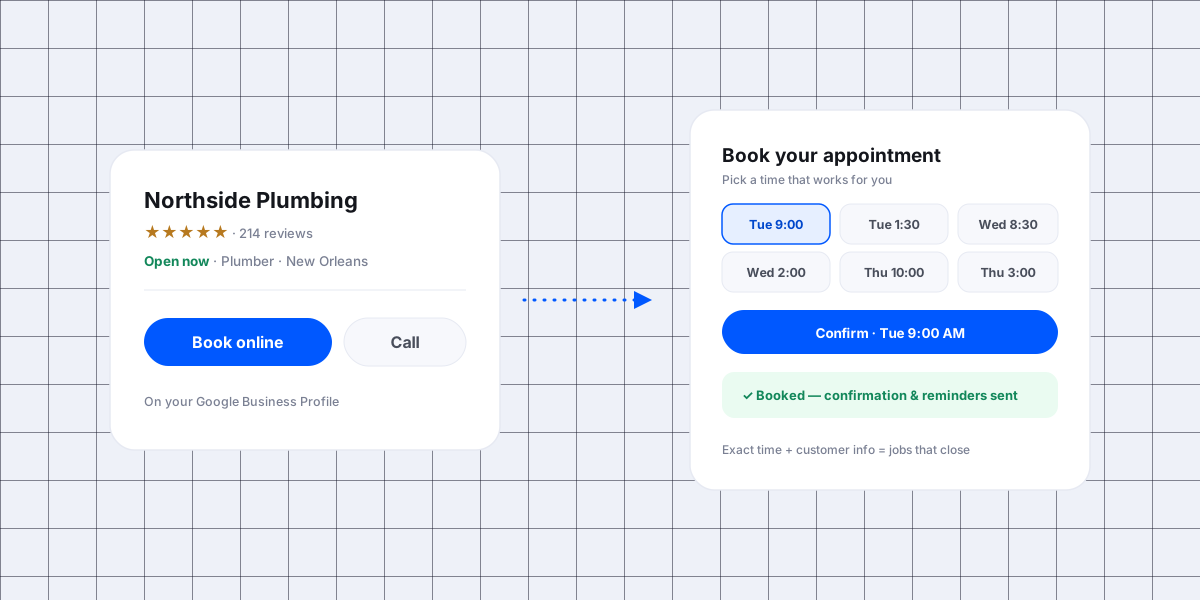
Most people find you on Google before they ever reach your website. Google Business Profile (what used to be called Google My Business) can show a booking button right on your listing, so a customer can book without a single extra click.
The native "Book" button
If your booking provider is connected to Google's booking partners, a Book Online button can appear directly on your Profile in Search and Maps. That's the shortest possible path from "found you" to "booked."
A booking link on your Profile
Even without a native integration, you can add your booking link as the Profile's appointment link, and as the primary button on your website. Same idea: one tap to a page that shows real times.
The goal is the same everywhere a customer meets you, website, Google, Facebook, even a text reply, one obvious button that leads to a real booking flow. If you also run paid social, the same rule applies to the form behind the ad: send Facebook lead ads straight into your CRM so those leads get called instead of sitting in Leads Center.
What actually gets people to submit an appointment
A booking button only works if the page behind it does. Here's what moves the needle.
Show real, specific time slots
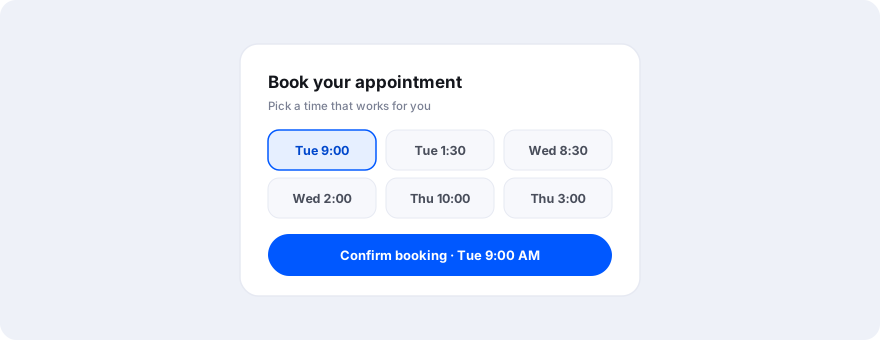
This is the big one. "Request a callback" converts poorly because nothing is committed. Showing actual open times, Tue 9:00 AM, Tue 1:30 PM, Wed 8:30 AM, turns a vague inquiry into a decision. The customer picks a time and they're booked. That single change is the difference between a lead and an appointment.
Ask only for the details that matter
Every extra form field costs you bookings. Ask for exactly what you need to show up and do the work: name, phone, address, and the service. Skip the twelve-field form, you can get the rest on the call or on-site.
Confirm the booking instantly
The second someone books, send an instant confirmation by text and email, then automatic reminders before the appointment. Instant confirmation makes it feel real and cuts your no-show rate.
Make it effortless on mobile
Almost all of this traffic is on a phone. Big tap targets, no pinch-and-zoom, no account to create. If booking takes more than about a minute, you're leaving money on the table.
The numbers: exact-time appointments close better
Here's the pattern we see over and over across the service businesses we work with:
Appointments booked with an exact time and full customer information close at a dramatically higher rate than callback requests or vague "contact us" leads.
It makes sense when you break down why:
- Commitment. Someone who picked Tuesday at 9 has already decided. A callback request is still just window-shopping.
- You show up ready. With the address and the service in hand, your tech arrives prepared, no discovery call, no rescheduling, no dropped ball.
- Less time to lose them. Every hour and every back-and-forth between "interested" and "booked" is a chance for a competitor to call back first. An exact-time booking removes that wait. For the leads who never book themselves, this follow-up cadence is what you work by hand.
Layer that on top of what everyone already knows about speed to lead, where replying in minutes instead of hours has been one of the strongest predictors of whether a lead converts for close to twenty years, and a self-serve, exact-time booking button becomes one of the highest-ROI things you can put on your site.
Your exact results will vary by trade and market, but the direction is remarkably consistent.
How we set this up for Catch CRM clients
This is exactly what the Catch CRM booking tool does, and it's quick to stand up:
- One booking flow, everywhere, embed it on your website and drop the link on your Google Business Profile, Facebook, and in your text replies. The same profile is where your review requests point, so the two jobs share one listing.
- Real availability, exact times, customers see and pick actual open slots, not a callback queue.
- Only the right fields, name, phone, address, service. Booked in under a minute.
- Straight into dispatch, every booking shows up on your live board and gets assigned, with confirmation and reminders sent automatically.
Set it once, and every channel starts sending you booked appointments instead of missed calls.
The bottom line
Don't make people call you to give you money. Put a Schedule button everywhere they find you, show them real times, ask only for what you need, and confirm instantly. The exact-time appointments that come out the other side are the ones that actually close.
Want it live on your site and your Google Business Profile this week? Get a free demo and we'll set up your booking flow with you.