
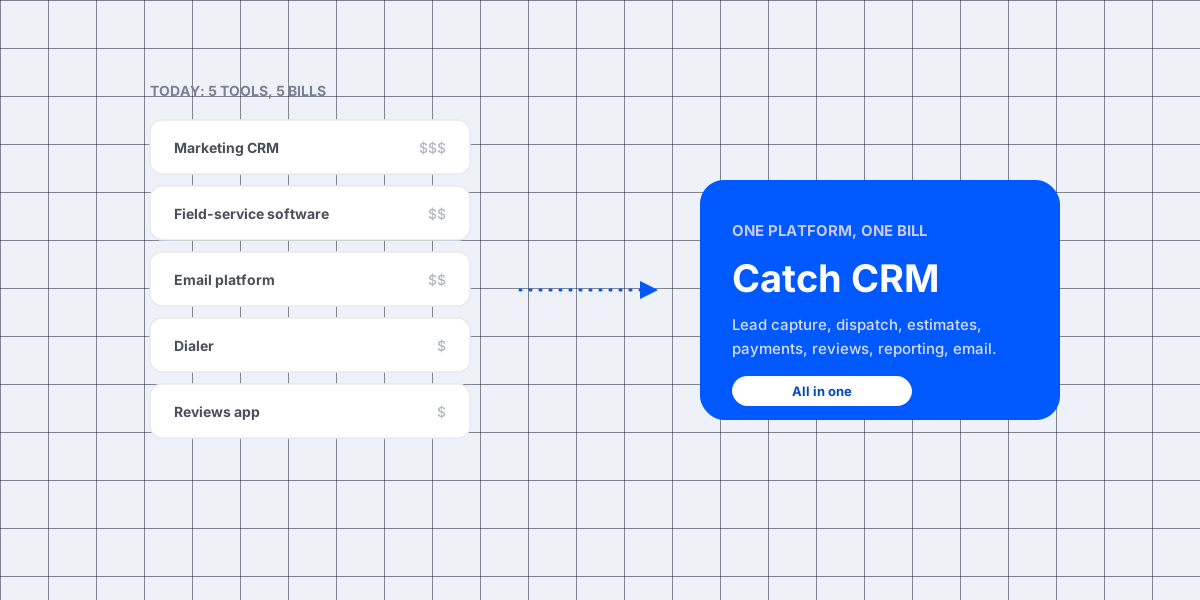
Nobody sits down and decides to run their business on five pieces of software. You bought one to book jobs. You added another because the first one could not send a decent email. Then a dialer, then something for reviews, and now there are five bills and five logins.
I am Daren Hirsch. I build software for service businesses. I have watched a lot of owners build that stack one subscription at a time, usually with HubSpot or Jobber at the bottom of it. This post is about what that pile actually costs you, which of those two tools is worth keeping, and when it is time to stop adding to it.
By the end you will know what the two-tool stack costs in money and in hours, where HubSpot genuinely fits, where Jobber genuinely fits, what you give up by combining them, and how to tell which of the three options suits your shop.
Short answer: HubSpot is a sales and marketing CRM. Jobber is field-service software. Neither one does the other's job, so shops that buy both usually end up adding an email platform, a dialer, and a reviews app on top. That is five logins and five bills to run one business. If you want the field operations and the lead follow-up in one place, that is what an all-in-one platform is for.
The tool-stack problem
You didn't set out to become a systems integrator, but that's what running five tools turns you into. The cost isn't only the five subscriptions. It's that none of them talk to each other:
- Your ad leads never connect to your booked revenue.
- Your tech in the field can't see the customer's history.
- Your "reports" are five separate dashboards nobody opens.
- The lead that came in at 9 p.m. sits in one system while your follow-up lives in another.
When the tools don't share a spine, the work of stitching them together is yours.
What the two-tool stack actually costs
The subscription line is not the whole bill, which is the part most comparison posts skip. Take a three-technician shop. Jobber's publicly stated pricing is $29 per tech plus a monthly plan of $39 to $199, plus $29 a month if you add their AI Receptionist. That is $87 a month in tech charges before you pick a plan. HubSpot is priced separately, by hub and by contact count, and it climbs as your list grows. Then you are still paying for:
- an email platform, because neither tool is where you want to run campaigns
- a dialer, if you want a new lead auto-called in seconds instead of hours
- a reviews app, because the review request has to fire on its own or it never goes out
For comparison, a Catch CRM technician seat is $25 a month, all-inclusive, and plans are $0, $30, $99, and $249 a month. Three seats is $75. Email campaigns, the booking widget, review automation, and reporting are in the plan, not bolted on.
The bigger number is the one nobody invoices you for. Say your office manager spends an hour a week moving a lead from one system to another, and working out which tool a job is sitting in. Average pay across the private sector was $37.75 an hour in August 2026. That hour costs you about $1,963 a year, and it buys nothing a customer will ever see. Add the jobs that never get chased because they sat in the wrong tool, and the stack is the priciest line here.
Two more costs belong on the page. Software you buy outright can often be written off the year you start using it, because the IRS counts "off-the-shelf computer software" as section 179 property. A subscription is just a running cost instead. Your records also have to survive the switch. The IRS says to keep the receipts behind anything on a tax return until the period of limitations ends, which is three years in most cases. Five tools means five places those receipts live.
Prices here are the figures each company publishes and they change. Check current pricing before you decide anything.
Where HubSpot fits, and where it doesn't
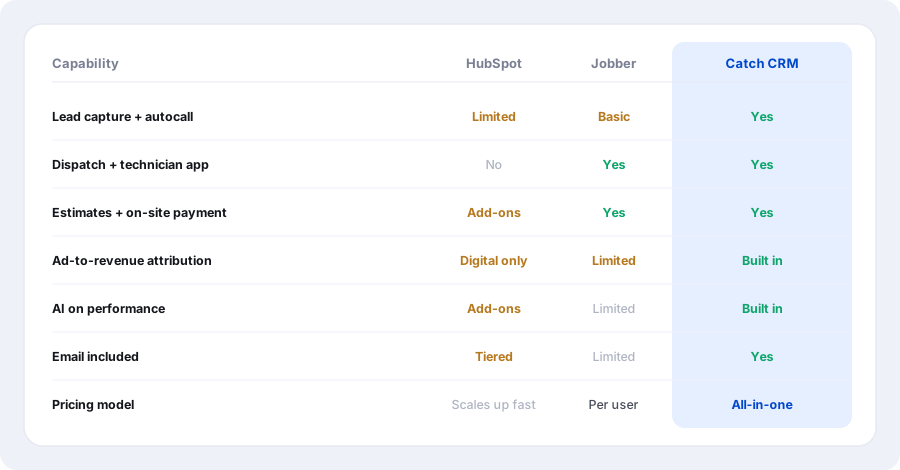
HubSpot is an excellent CRM for sales and marketing teams. If you run a digital funnel with inside-sales reps, its automation, email, and pipeline reporting are hard to beat.
Where it struggles for a service business: it was never built for the field. There's no dispatch board, no technician app, no on-site estimates or tap-to-pay, no "track your tech" link for the customer. And the price climbs quickly as you add the marketing, sales, and service hubs plus more contacts. For a shop that runs trucks, HubSpot is a powerful tool aimed at a different job.
Where Jobber fits, and where it doesn't
Jobber is purpose-built field-service software, and home-service pros love it for good reason. Scheduling, dispatch, quotes, and invoicing are clean and clearly built for the trades.
Where it leaves gaps: it's an operations tool more than a growth engine. Speed-to-lead is basic, with no auto-dial that rings a new lead and transfers a live agent. Marketing and ad-to-revenue attribution is limited. And there's little AI to tell you how your salespeople or your ad campaigns are actually performing. You still end up bolting on an email platform, a dialer, and a reporting layer.
Weighing Jobber on its own rather than as half of a stack? The head-to-head numbers sit on our Catch CRM vs Jobber page. There are the same breakdowns for Housecall Pro, ServiceTitan, and Workiz.
What a service business actually needs in one place
Strip it back and the job is the same for every service business:
- Catch every lead, fast. Auto-dial and live-transfer new leads before they call the next name on the list.
- Run the day. A dispatch board and a technician app that runs the job on-site.
- Get signed and paid. Good, Better, Best estimates, online approval, and payment in the driveway. Worth reading first: quote vs estimate, because only one of the two locks your price, and what to send when an invoice goes past due.
- Keep customers in the loop. Confirmations, reminders, "on the way," and an automatic review request.
- Know what makes money. Reporting that ties a paid job back to the ad that produced it, and AI that reads performance for you.
- Email that isn't a second bill.
What that looks like day to day depends on the trade. A plumbing shop needs the burst-pipe call answered first. An HVAC shop needs the August overflow caught and the maintenance plans off the spreadsheet. A garage and door shop needs the broken spring booked same day. A painting crew needs the bid out before the other two painters get theirs in. Same six jobs, different order of urgency.
The all-in-one alternative
Catch CRM is built to be the one tool instead of five. It carries the lead capture and autocall dialer of a sales CRM, plus the dispatch board and technician app of field software. On top of that sit estimates, invoices, and on-site payments, reviews on autopilot, automations, and reporting that ties a paid job back to its lead source. Email is included, not a separate subscription, so it is one login and one bill against a single source of truth.
Based on each product's typical positioning for service businesses. Check current feature lists before you decide.
Which one is right for you
The honest version:
- Choose HubSpot if you're a marketing or inside-sales org running a digital funnel and you don't need field operations.
- Choose Jobber if you want clean field-service ops and you're happy to run your marketing, dialing, and reporting somewhere else.
- Choose Catch CRM if you want the field-service operations and the lead capture, marketing attribution, and AI in one place, without stitching five tools together.
If two of those sound right, the tiebreaker is usually headcount. The stack works while one person can hold it together in their head. It stops working the week you hire the third tech.
FAQ
Is Catch CRM a replacement for HubSpot?
For a service business it replaces what HubSpot is usually bought to do: lead capture, pipeline, email, and the follow-up that runs itself. It also adds the field work HubSpot does not cover. If you're a pure digital-marketing team, HubSpot may still be the better fit.
Is Catch CRM a replacement for Jobber?
Yes. It covers the same core field-service work (scheduling, dispatch, a technician app, estimates, and invoicing) and adds speed-to-lead, marketing attribution, and AI reporting on top. The line-by-line pricing comparison is on the Catch CRM vs Jobber page.
Do I have to switch everything at once?
No. Import your customers, turn on what you need first, and add the rest as you grow. The steps are in the CSV import guide, and migration help is included.
Can I keep using QuickBooks?
Yes. Estimates, invoices, and payments sync both ways, so you're not double-entering anything.
What if I only have one technician?
Then the stack probably still works, and you should not tear it up for the sake of it. The case for consolidating gets strong at around three techs, when nobody can hold the whole pipeline in their head anymore.
The bottom line
HubSpot and Jobber are good tools. But running a service business on both, plus an email app, a dialer, and a reviews tool, means five bills and no single source of truth. Catch CRM is the alternative that does the whole job in one place, built for the way service businesses actually run.
Want to see it on your own jobs? Get a free demo and we'll set it up with you.