
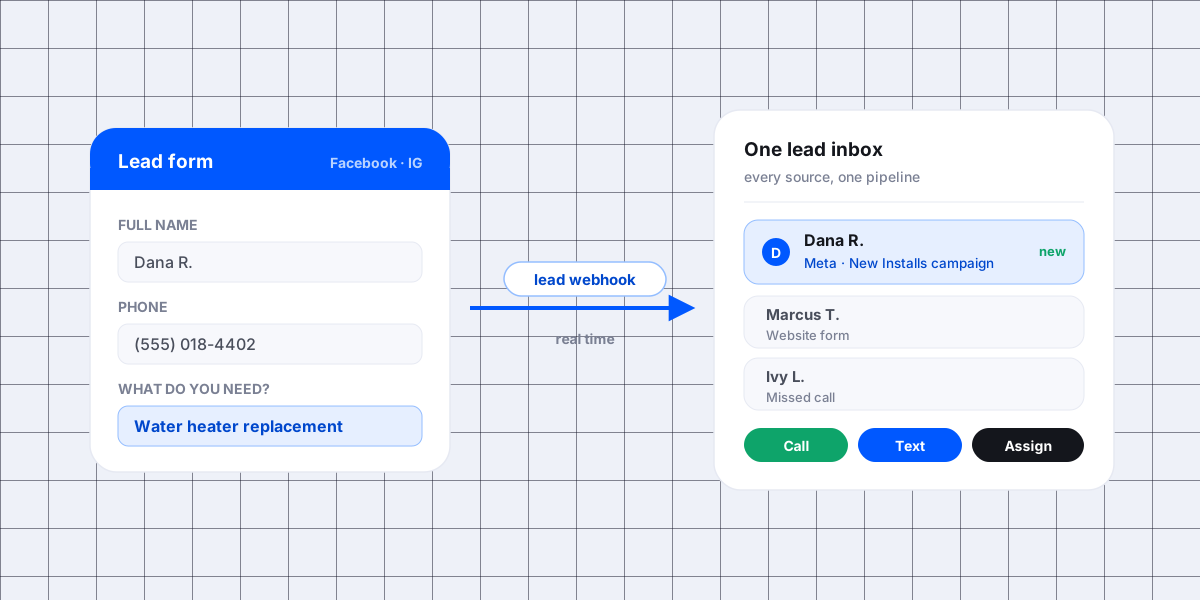
A Meta lead ad is the easiest form a customer will ever fill out. Two taps, and you have their name, phone, and email. Then the lead sits inside Facebook while your office is out on jobs, and by the time someone opens the Leads Center that customer already booked with the guy who called back first.
To connect Facebook lead ads to your CRM, you point Meta's lead webhook at one system, grant that system lead access on your Page, map the form fields to your contact fields, and let the CRM run the follow-up. Once that is done, Meta leads go to the same place as your other leads and your automations start the moment the form is submitted, not the next time someone logs in.
Key takeaways
- Real time beats downloads. Meta can push each lead to your system the second it is submitted, so nobody has to remember to check anything.
- One inbox, or the math never works. Meta leads, calls, and website forms all need to go into the same pipeline, or you can never tell which ad paid for itself.
- The break is almost always permissions. Page lead access and form selection quietly reset, and leads stop arriving with no error message.
- Speed is the whole product. A lead answered in seconds books far more often than the same lead called back the next morning.
I set this up for service companies most weeks. The pattern below is what I see over and over on plumbing, garage door, locksmith, and painting accounts.
The three ways to get a Meta lead out of Facebook
Meta gives you three paths, and they are very different in speed.

1. Download the leads by hand
You open Leads Center or Ads Manager and export a spreadsheet. It works, and it costs nothing, but the lead is only as fresh as the last time somebody downloaded the file. Every export is also a retyping job into your CRM, which is where phone numbers get typo'd.
2. Watch the alerts
Meta can notify a Page admin when a lead comes in. That is better than a weekly export, and it still puts a human between the customer and the callback. Alerts pile up on one person's phone, and on a busy Friday they get swiped away.
3. Send the lead straight to your CRM
This is the real integration. Meta's Graph API has a leadgen webhook, and according to Meta's developer documentation, webhooks for leads "can send you real-time notifications of changes to your Page's Lead ads." Every submission pings your CRM with the lead ID, page ID, form ID, and ad ID, and the CRM pulls the full answers back.
Meta's guide on retrieving leads is blunt about the difference between the two API options: webhook pings arrive "with a delay of up to a few minutes," while the bulk read is meant for pulling leads "a few times a day." For a service business, a few minutes is fine. A few times a day is a lost job.
What you actually need to connect it
The setup is short, and it is the same for Facebook and Instagram lead forms because both run on the same Meta plumbing.
- A Page admin with lead access. Meta requires the app pulling your leads to hold the
leads_retrievalpermission for that Page, per the same developer documentation. Your CRM asks for this during the connection. - The right form selected. You pick which lead forms sync. New campaign, new form, and that new form has to be picked too.
- Field mapping. First name, last name, phone, email, and your custom questions each need a home in the CRM. Map the custom questions, not just the standard four, or the answer that tells you the job type disappears.
- A destination pipeline. Decide what stage a Meta lead enters and who owns it. A lead with no owner is a lead nobody calls.
- A test lead. Submit one through Meta's lead ads testing tool, then go find it in the CRM before you turn the ad spend up.
The 5 ways I see this connection break
Nothing announces itself when a Meta connection fails. Leads just stop, and the ad account keeps spending.

1. Page lead access got reset
Somebody changed Page roles, moved the Page into a new business portfolio, or removed an old admin, and the CRM's access went with it. This is the number one cause I find, and the fix takes two minutes once you know to look.
2. The new form was never added
The ads keep running, the media buyer duplicates a form for a new offer, and only the old form is wired up. Half your leads sync, half vanish. Always check the form list after a campaign change.
3. Field mapping drifted
A custom question gets reworded and the mapping breaks. The lead still arrives, but the field you route on, like city or service type, comes in blank and the routing rule stops firing.
4. The webhook subscription lapsed
Tokens expire and app permissions get revoked during business account cleanups. Nothing errors out on your screen. You find out when a day shows normal ad spend and zero leads.
5. The lead comes in and nobody owns it
This one is not Meta's fault. The lead syncs perfectly, sits in a stage with no assignment rule, and no one calls it. On paper the integration works. In the truck, the job is gone.
What to automate the second a Meta lead comes in
Getting the lead into the system is step one. The money is in what happens next, and none of it should need a person.

- Call them first. Ring the lead while they still have your ad on screen. An autocall dialer does this in seconds and bridges the customer to whoever is free. Check what that call looks like on their end too, because a number labeled as spam never gets picked up no matter how fast it dials.
- Text at the same time. Some people will not answer an unknown number but will reply to a text. Send both, and check your number is cleared for business texting first, because an unregistered one gets filtered without telling you. What 10DLC registration is and whether you need it covers that.
- Assign an owner. Route by service, by city, or round robin, so the lead has a name on it before anyone reads it.
- Tag the source. Campaign, ad set, and ad ride along with the lead record. That is what makes cost per booked job possible later.
- Start a sequence if they do not answer. Two calls and two texts over the next few days catch a lot of people the first attempt missed. How many times to call a lead before you give up lays out the full 14-day schedule.
- Kill duplicates. The same homeowner fills out two ads in a week. Merge on phone number so they do not get called twice by two techs.
If a tool sits between Meta and your CRM, check its delay before you trust it. Some connectors batch on a timer, and a 10 minute batch quietly undoes everything the webhook was for.
Send data back to Meta, not just out of it
The connection works both ways, and this half gets skipped. Meta's Conversions API accepts marketing data from "an advertiser's server, website platform, mobile app, or CRM," which means you can tell Meta which leads became booked jobs instead of leaving it to guess.
Two things come out of that. The ad algorithm starts optimizing toward the leads that actually buy, not the ones that are cheap to collect. And your customer lists can go back as audiences, so past customers get the maintenance offer and dead leads get retargeted. If you want the reporting side of this, I wrote a separate piece on which Facebook ads actually make money.
How to check it is still working
Run this once a month, and after every campaign or Page change. It takes five minutes.
- Submit a test lead on each live form.
- Confirm it shows up in the CRM with every field filled, custom questions included.
- Confirm the call or text fired, and check the timestamp gap.
- Confirm a person is assigned.
- Compare yesterday's lead count in Ads Manager to yesterday's lead count in the CRM. The numbers should match.
That last step is the one that catches a silent failure the same day instead of at the end of the month.
FAQ
Do I need Zapier to connect Facebook lead ads to my CRM?
No, if your CRM has a native Meta integration. A native connection uses Meta's own lead webhook, so it is faster and there is one less account to keep alive. Zapier is the right answer when you also need the lead copied into a tool your CRM does not talk to.
Why are my Facebook leads not syncing to my CRM?
Check in this order: Page lead access, whether the new lead form was added to the connection, field mapping, and the app's permissions. Submit a test lead after each check. In my experience it is a permission or a missing form far more often than a real technical failure.
Can Instagram lead ads go to the same place?
Yes. Facebook and Instagram lead forms both belong to the same Meta Page and run through the same lead system, so one connection covers both. You do not need a second integration.
Can I still download leads as a spreadsheet?
Yes. Leads Center and Ads Manager still let you export, and it is a useful backup while you are setting the sync up. Do not run your business on it, because a lead you download tomorrow is a lead your competitor already called today.
How fast should someone call a Meta lead?
Seconds, not hours. Meta ads reach people who were not shopping five minutes ago, so their interest fades fast, and the research behind that five minute target is worth reading once. The shops I work with that dial inside a minute book noticeably more of the same leads than the ones who call back the next morning.
Get your Meta leads into one place
Every Facebook and Instagram lead should be in your CRM, called, and assigned before the customer moves on to the next ad. If yours are still sitting in Leads Center, get a free demo and we will wire up your Meta forms, your routing, and your follow-up with you on the call.